


Operating instructions for Mufftech
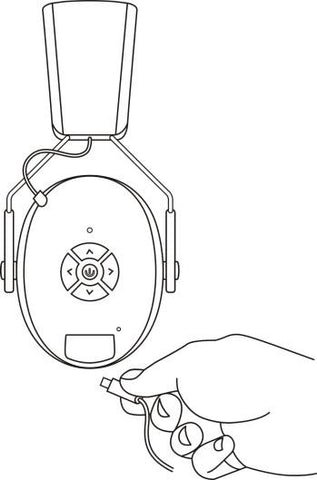
Charging the Earmuffs:
Your hearing protector has been shipped to you with only a partial charge on its integrated lithium ion battery pack. To charge the hearing protector, insert the supplied Type-C connector cable into the Type-C jack located on the bottom of the right cup of the hearing protector. Connect the other end of the cable to a suitable USB power source such as a computer or third party certified (UL, Intertek, etc.) AC to USB wall adapter.
The LED will be blink red while charging and change to solid red when complete.
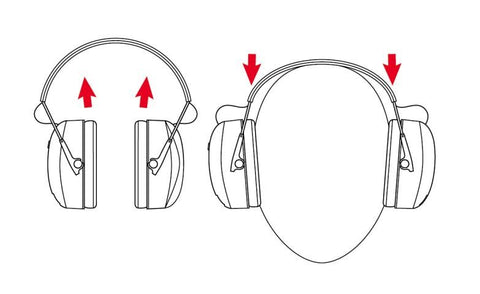
Fitting the Headset:
Fully extend sliders and place cups over ears. Then tighten headband using sliders.
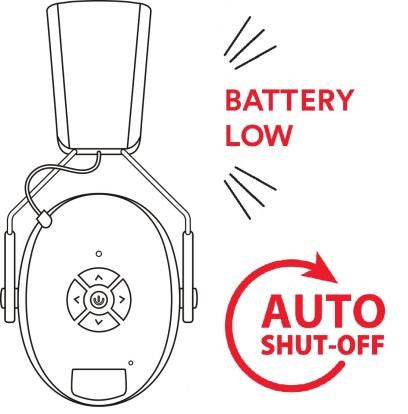
Power
Press and hold power button for 2 seconds to power ON/OFF headset.
Low Battery Warning
Hearing protector will also provide a “Battery Low” warning by bleeping voice when battery voltage is low.
Auto Shut-Off
5 minutes after either Bluetooth or the audio input is disconnected, the hearing protector will automatically power down. After auto shut-off, press and hold the ON/OFF button for 3 seconds to turn back on.
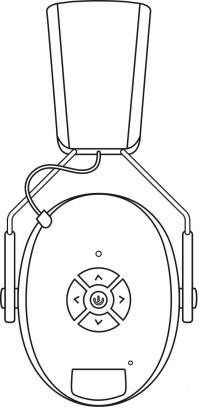
Pairing the Device
Once powered on, the LED will be blink blue.
Make sure your Bluetooth enabled device is scanning/searching for devices. Check your device to make sure it has discovered “Mufftech” Select “Mufftech” to connect to the hearing protector.
Once connected successfully, the LED on the right cup will turn blue.
Your Bluetooth audio volume will be controlled by your device.
The next time you power up, your hearing protector will automatically connect to your device
Forward/Back, Volume control, Pause/Play
To pause or play audio on your device, you can single press the POWER button. To advance tracks, press the “>” button. Press “<” to select the previous track.
Press the “ up ” “ down ” buttons to adjust the volume.
*Some devices may not be compatible with this feature and will have to be operated using their native controls.
Note: Please adjust the volume of the phone too when connecting if you think it is too loud or too low!!!
Incoming Calls
In Bluetooth mode, incoming phone calls will cause the music to be muted and you will hear your phone’s ringtone. To answer an incoming call, press the middle power button once.
To disconnect from a call, press the middle power button once more.
To reject a call and return to Bluetooth audio, press and hold the middle power button.
WARNING:
*Do not listen at high volume levels for long periods.
*Disposal of a battery into fire or a hot oven, or mechanically crushing or cutting of a battery, that can result in an explosion.
*Leaving a battery in an extremely high temperature surrounding environment or a battery subjected to extremely low air pressure that can result in an explosion or the leakage of flammable liquid or gas.
*This product must not be disposed of or dumped with your other household wastes. You are liable to dispose of all your electronic or electrical waste equipment by relocating over to the specified collection point for recycling of such hazardous waste. Dispose of components in accordance with all applicable local and governmental regulations
Installing Mufftech Ear Cushions


- please note attenuation may change slightly when using the soft or gel ear cushions
Installation of Mufftech Helmet Connector onto the original Mufftech's


Hearing Protection & Safety
Your hearing matters to us. This page explains how Mufftech hearing protection works, how to use it safely, the standards our products are tested to, and the legal terms that apply when you buy and use them. Please read it before relying on any Mufftech product for protection against hazardous noise.
1. Important safety notice
Mufftech earmuffs are passive hearing protectors designed to help reduce your exposure to hazardous noise. They help protect your hearing — they do not eliminate all sound and cannot, on their own, prevent hearing loss.
Noise-induced hearing loss is permanent and largely preventable. Misuse, a poor seal, the wrong product for the noise level, or failing to wear protection at all times while exposed to noise may result in hearing loss or injury. If you are unsure whether a product is suitable for your environment, consult a qualified safety professional or audiologist before use.
2. Certification and standards
Mufftech earmuffs are tested and rated to recognised hearing-protection standards:
- AS/NZS 1270:2002 — the Australian/New Zealand standard for hearing protectors. Our earmuffs are rated SLC80 26.0 dB, Class 5.
- ANSI S3.19-1974 — the United States test standard used to derive the Noise Reduction Rating (NRR).
- EN 352 — the European standard for hearing protectors, where stated on the product.
These ratings describe performance measured under controlled laboratory conditions, with the product correctly fitted, fully sealed, and using the original ear cushions supplied. They are a guide to a product's capability — not a guarantee of the protection any individual will receive in real-world use. Certification figures published on our website reflect the test certificates held for the relevant product.
3. Understanding noise reduction ratings
Laboratory ratings are achieved by trained users under ideal conditions. In everyday use, most wearers receive less noise reduction than the published figure, because real protection depends heavily on fit, seal, condition of the product, and how consistently it is worn.
For this reason, regulators and manufacturers recommend "derating" the published figure when assessing whether a protector is adequate for a given noise exposure. You should apply the rating and any derating in accordance with the regulations and guidance that apply to your workplace or activity, and confirm adequacy with a qualified person — not rely on the headline number alone.
4. Correct use and fit
To receive meaningful protection you must:
- Wear the earmuffs at all times while exposed to hazardous noise — even brief removal in a loud environment significantly reduces overall protection.
- Achieve a complete seal around each ear. Long hair, the arms of glasses, hats, hoods, jewellery, and PPE straps can break the seal and substantially reduce protection.
- Position the earmuffs correctly over the ears with the headband adjusted for a firm, comfortable fit.
- Inspect the cushions, headband and earcups regularly. Replace cushions and any worn, hardened, cracked or damaged parts promptly — a degraded seal means degraded protection.
- Select a protector with a rating adequate for your noise environment, and follow all instructions supplied with the product.
5. Workplace use and your responsibilities
Hearing protectors are one part of managing noise — not a substitute for engineering noise controls, a workplace hearing-conservation programme, or professional safety advice.
Where hearing protection is used to meet a legal requirement, it is the responsibility of the employer, PCBU, or individual to select appropriate protection, confirm it is adequate for the measured noise exposure, and ensure it is used correctly. In New Zealand, refer to WorkSafe New Zealand guidance and the Health and Safety at Work Act 2015. In Australia, refer to Safe Work Australia and the relevant state or territory regulator. Workplaces may have their own rules about which devices are permitted — check with your manager or safety officer before relying on any product on site.
6. Replacement and aftermarket cushions
The certified attenuation of Mufftech earmuffs is measured with the original ear cushions supplied with the earmuffs, and applies only to that original, as-tested configuration.
Replacement or upgrade cushions — including our Soft Ear Cushions and Cooling Gel Ear Cushions — are designed primarily for comfort and fit. Changing the ear cushions alters the seal, clamping pressure and acoustic properties of the earmuff. As a result, the noise reduction you receive b and has not been separately certified in that configuration.
If you need a specific, certified level of protection — for example to satisfy a workplace requirement — use the original cushions supplied with the earmuffs, and have the fit and adequacy confirmed by a qualified safety professional. You are responsible for confirming that protection is adequate for your noise exposure when using replacement or aftermarket cushions.
7. Electronic features — Bluetooth, battery and volume
Mufftech earmuffs include electronic audio features. Listening to audio at high volume, for long periods, can itself contribute to hearing damage independent of external noise — keep volume at the lowest comfortable level. Audio playback does not increase the hearing protection provided by the earmuffs.
Charge and store the product according to the instructions supplied. Do not use a product with a damaged battery, cable or housing. Bluetooth range and performance vary with environment and device, and are not a safety feature.
8. Product information accuracy
We work to ensure product descriptions, specifications and images on this website are accurate and current. Specifications, packaging and included accessories may change, and minor variations or errors may occur. Always read the labels, warnings and instructions supplied with the product, and do not rely solely on website information when making a safety-critical decision. If anything is unclear, contact us before use.
9. Not professional or medical advice
Information on this website and this page is general in nature and is provided to help you use our products safely. It is not occupational-health, audiological, legal, or other professional advice, and it does not account for your specific workplace or circumstances. For advice specific to your situation, consult a qualified safety professional, audiologist, or your workplace's health and safety representative.
10. Limitation of liability
To the maximum extent permitted by law, Mufftech is not liable for any hearing damage, loss, or injury arising from improper selection, fit, use, modification, maintenance, or storage of its products, or from use of products with replacement or aftermarket components. Our liability for any product is limited to the extent permitted by applicable law. Nothing in this section limits or excludes any right or remedy that cannot lawfully be limited or excluded — see your consumer rights below.
11. Your consumer rights
Nothing on this page excludes, restricts or modifies any consumer guarantee, right or remedy that applies to you and cannot lawfully be excluded.
If you are a consumer in New Zealand, our goods come with guarantees that cannot be excluded under the Consumer Guarantees Act 1993, and we must not make misleading claims under the Fair Trading Act 1986. If you are a consumer in Australia, our goods come with guarantees that cannot be excluded under the Australian Consumer Law. These statutory rights apply in addition to, and are not limited by, the terms on this page.
12. Warranty and returns
Mufftech products are covered by our standard warranty and return policies. Please see our Return Policy and Terms of Service for full details. These policies operate alongside, and do not reduce, your non-excludable consumer rights.
13. Contact us
If you have any questions about the safe use, suitability, or specifications of a Mufftech product, please contact us before relying on it for hearing protection:
Email: support@mufftech.com